 Search Tips
Check Register Report
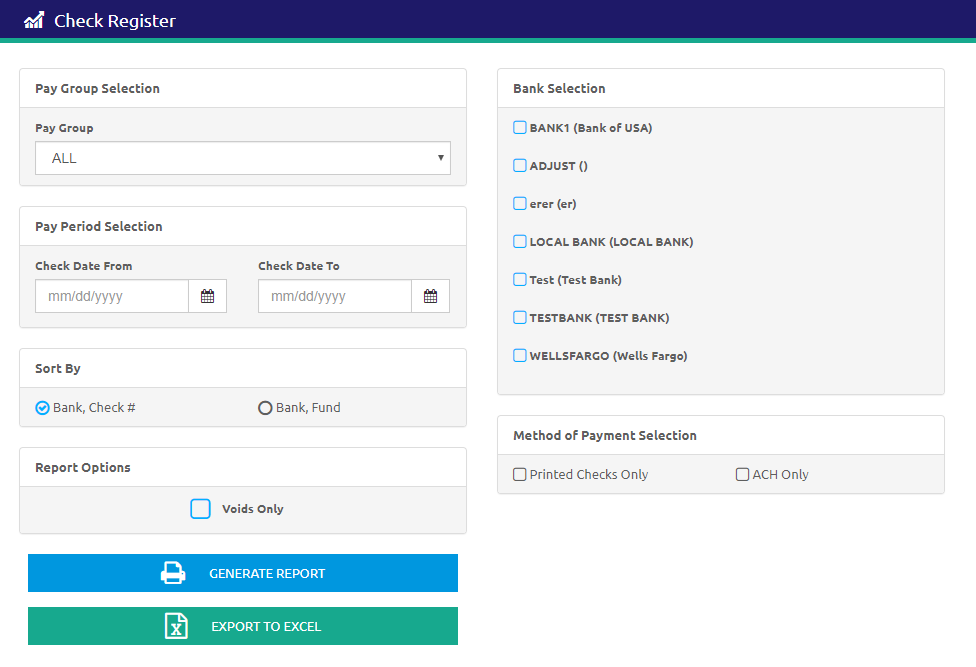
The Check Register Report lists paychecks for the selected pay group(s) and pay period or date range. Use this report to generate a report of all payroll checks generated or voided for a specific pay group and time period.
-
Select a pay group from the Pay Group drop-down list. ALL is selected by default.
-
Enter a Pay Period Selection using the Calendar fields in the Check Date From an To fields.
- Select an option to Sort By. This determines how the report is organized when it prints.
- Check the Voids Only box to only include voids in the report.
- Select the banks to be reported from the Bank Selection list.
- Select Printed Checks Only or ACH Only in the Method of Payment Selection section. The Printed Checks Only option will include PreNotes.
- Click the
.png) button to create the report. A Summary by Payment Type is at the end of the report.
button to create the report. A Summary by Payment Type is at the end of the report. - Click the
 button to export the data to Excel.
©2021 | EMS LINQ, Inc.
School LINQ Help, updated 01/2021